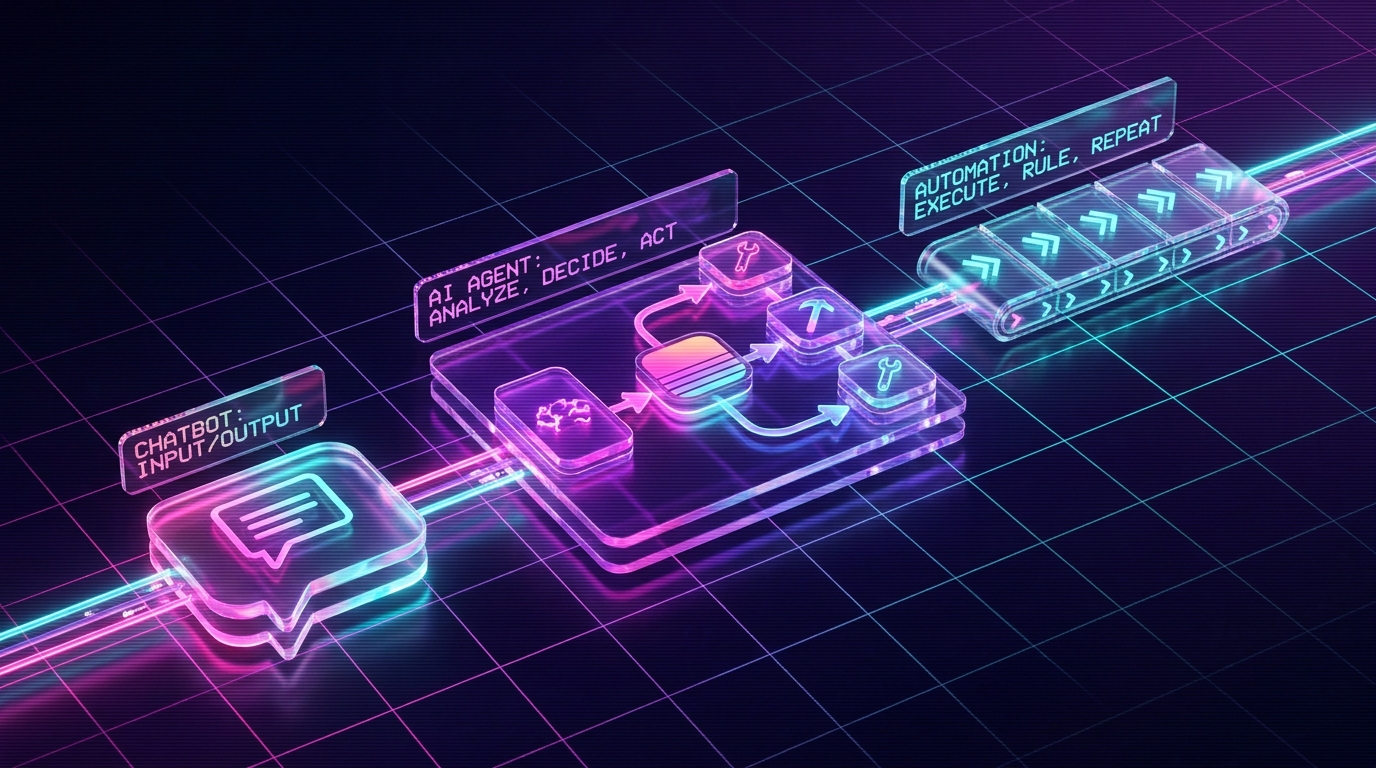
Chatbots answer. Automations follow fixed rules. AI agents decide what steps to take, use tools, and handle messy cases with guardrails. Use a chatbot when the job is mostly conversation or question-answering. Use automation when the trigger and steps are predictable. Use an AI agent when the goal is clear but the path depends on context, like triaging a support ticket after checking order history. Most businesses need all three. The expensive mistake is making a chatbot act like an agent, or paying for an agent where a two-step Zap would do.
What is the difference between a chatbot, an AI agent, and automation?
A chatbot talks with a user and returns an answer. Automation runs a fixed workflow, usually if this, then that. An AI agent uses an LLM, context, and tools to decide what action to take next. The difference is not intelligence. It is who chooses the next step.
That distinction matters because buyers keep buying the wrong thing. They ask for an agent when they need a simple automation. They buy a chatbot when they really need a support agent that can read orders, apply policy, and draft a response. Then they blame AI when the design was wrong from day one.
The shortest version: talk, follow, decide
Here is the plain-English split:
- Chatbot: talks. It answers questions, collects information, and can route people.
- Automation: follows. It runs steps a human already mapped out.
- AI agent: decides. It sees context, picks tools, takes action, and checks what happened.
None of the three is morally better. The right choice depends on the job. A chatbot is perfect for a pricing FAQ. Automation is perfect for copying a lead from a form into HubSpot. An agent is useful when the right move depends on what the customer said, what they bought, when it shipped, and what your policy allows.
| System | Best at | Decision style | Typical tools | Watch out for |
|---|---|---|---|---|
| Chatbot | Answering questions, lead capture, basic routing, internal helpdesk lookup | Chooses words. Usually does not choose business actions. | Website chat, knowledge base, CRM handoff, booking link | Sounds helpful while doing nothing useful behind the scenes |
| Automation | Predictable repeat tasks with clean triggers and known steps | Follows fixed rules written by a human | Zapier, Make, n8n, Shopify Flow, native app workflows | Breaks when the input is messy or the exception rate is high |
| AI agent | Messy work where the outcome is clear but the path varies | Chooses tools and next steps based on context | LLM, APIs, databases, files, approval gates, logs | Needs guardrails, evals, and human approval on sensitive actions |
What a chatbot actually does
A chatbot is a conversation interface. It can live on your website, inside Slack, inside a support widget, or inside an internal portal. It reads a message and replies in natural language.
The useful version has a knowledge base behind it. Your shipping policy, product docs, onboarding guide, pricing page, SOPs, or support macros become the source material. The chatbot retrieves the relevant context and writes an answer in the right tone.
That is enough for plenty of jobs. A website visitor asks, "Do you ship to Canada?" The bot answers. A new employee asks, "Where is the refund SOP?" The bot links it. A lead asks for a call. The bot collects email and sends them to a booking page.
The trouble starts when you ask a chatbot to be an operator. If it cannot inspect an order, apply policy, draft a refund, and hand it to a human for approval, it is not solving support. It is just having a polite conversation about support.
Use a chatbot when:
- The user needs an answer more than an action.
- The answer lives in docs, FAQs, policies, or product data.
- The failure cost is low and a human can take over quickly.
- You mainly need qualification, routing, or deflection.
What automation actually does
Automation is a set of fixed instructions. When this trigger happens, run these steps. That can be one action or forty, but the key point is that the path is known before the workflow starts.
Classic example: a lead fills out your intake form. Zapier writes the lead into HubSpot, posts a Slack message, and creates a Google Drive folder. There is no judgment. There is no reasoning. The input is structured, the steps are known, and the result is boring in the best possible way.
Automation is underrated because it is not flashy. A clean Zap can save more time than a badly scoped agent. If your task is already written like a recipe, do not add an LLM just because the market is loud.
Use automation when:
- The trigger is clear: order created, form submitted, tag added, invoice paid.
- The steps are always the same or close enough.
- The data is structured and predictable.
- You can explain the process with a flowchart and no "it depends" branches.
Automation fails when the exception rate gets high. "If customer asks about refund, do X" sounds simple until one customer has two orders, one damaged shipment, one discount code, and a warranty claim. That is where fixed rules start to sprawl.
What an AI agent actually does
An AI agent is software that gets a goal, reads context, chooses tools, takes action, and observes the result. It does not need every step pre-written. It needs a clear job, clear tool permissions, and clear rules for when to stop or ask a human.
A support agent might read a ticket, look up the Shopify order, check the shipping status, read the refund policy, draft a reply, and prepare the refund action. If the refund is under $50, it may send for approval to a team lead. If it is over $50, it may escalate with a summary and recommended next step.
That is not magic. It is a loop:
- Read the current situation.
- Decide what information or action is needed next.
- Use a tool.
- Inspect the result.
- Continue, escalate, or stop.
The agent is useful because messy work rarely follows a perfect flowchart. It needs enough judgment to pick the next step, but not enough freedom to wreck your business. That is why good agent builds are mostly tool design, permissions, logs, approval gates, and boring tests.
Use an AI agent when:
- The outcome is clear, but the path varies case by case.
- The agent needs to read multiple systems before acting.
- The work involves judgment, classification, drafting, or triage.
- You can put human approval in front of risky actions.
The decision tree
Use this before you spend money.
Pick the smallest system that solves the task
- Does the user mainly need an answer? Start with a chatbot.
- Are the trigger and steps known in advance? Use automation.
- Does the right path depend on context? Use an AI agent.
- Could a wrong action hurt a customer, account, or bank balance? Add human approval.
- Can you measure whether the work was done right? Ship it. If not, define the scorecard first.
The scorecard matters. "Be helpful" is not a scorecard. "Correctly classify 95% of support tickets, draft replies under 180 words, and escalate warranty, legal, and angry-customer tickets" is a scorecard. Agents need a tight target or they drift.
Four business examples
Customer support
A chatbot answers common questions: shipping timelines, discount rules, return window, product compatibility. Automation tags tickets and routes VIP customers. An AI agent reads the ticket, checks the order, drafts the reply, prepares actions, and asks for approval when money or reputation is on the line.
This is the pattern we like: chatbot for the front door, automation for clean handoffs, agent for messy tickets. The human becomes QA and final say. That is how you multiply one support rep without pretending customers want to be handled by a bot with a smiley face.
Marketing content
A chatbot can help a team find brand guidelines or answer "what is our preferred phrasing?" Automation can publish approved posts on a schedule. An AI agent can research a topic, draft the article, check internal links, generate a content brief, and hand the draft to a human editor.
Do not let the agent publish straight to your site on day one. Let it draft. Let it check. Let it suggest. Humans approve the public surface until the agent earns more autonomy.
Sales ops
Automation moves a lead from a form into the CRM and pings Slack. A chatbot qualifies basic questions on the site. An AI agent reads the company website, summarizes fit, checks whether the lead matches your ideal customer profile, drafts a first email, and queues it for review.
This is where agents shine because the inputs are messy. Every website is different. Every prospect has different clues. A fixed workflow can store the lead. It cannot read the business and write a useful briefing.
Finance and operations
Automation pulls daily sales into a spreadsheet. A chatbot answers "what is our refund policy?" An AI agent compares Shopify revenue, ad spend, refunds, inventory, and chargebacks, then flags what changed overnight.
The agent should not file taxes or approve wires. It can prepare the daily readout, find weird numbers, and draft questions for the human who owns finance. That is still valuable. Boring financial awareness is where a lot of small businesses leak cash.
How they work together
The best systems are hybrids. A chatbot collects the messy human input. Automation handles the predictable plumbing. An agent handles the context-heavy middle. Then automation logs the result and notifies the right person.
Example support flow:
- Customer opens chat and describes a damaged package.
- Chatbot collects order email, photo, and issue type.
- Automation creates a Gorgias ticket and tags it
damage_claim. - AI agent reads the ticket, checks Shopify, reviews policy, and drafts the reply.
- Human approves the refund or edits the message.
- Automation updates the ticket, logs the refund, and posts the summary to Slack.
That flow is not glamorous. It works. The customer gets a better answer faster, the team keeps control, and nobody pretends AI should make the final call on a weird edge case.
Where people get it wrong
They buy the most advanced thing first
Most businesses do not need a full agent as their first AI project. They need one boring workflow cleaned up. If the task is structured, start with automation. If the task is conversation-only, start with a chatbot. Save agents for work that actually needs judgment.
They give chatbots jobs they cannot do
A chatbot that cannot see orders should not answer order-specific questions. It will guess, apologize, or stall. None of those help. If the answer depends on private data, connect the system properly or route to a human.
They skip guardrails because the demo looked good
Demos are usually clean. Production is where users paste strange screenshots, angry messages, missing context, coupon edge cases, and bad data. A real agent needs limits in code: what it can read, what it can write, when it must ask, and what it is never allowed to do.
They forget the human workflow
An AI system that creates more review work than it removes is not done. The approval screen, Slack summary, audit log, and escalation path matter. They are not admin fluff. They are how humans trust the system enough to use it every day.
Frequently asked questions
Is ChatGPT a chatbot or an AI agent?
ChatGPT in a normal browser tab is a chatbot or assistant. It becomes agent-like only when it can use tools, inspect results, make decisions, and keep working toward a goal without you writing every next step.
Is Zapier an AI agent?
No. Zapier is workflow automation. It follows triggers and actions you define in advance. An AI agent may use Zapier, Make, or n8n as part of its toolset, but the automation itself is not the agent.
Should I build a chatbot or an AI agent first?
Start with the simplest thing that solves the job. If the job is answering common questions, build a chatbot. If the job follows predictable steps, build automation. If the job requires context, tool use, and judgment, build an agent.
Can a chatbot take actions?
Yes, a chatbot can be wired to actions like creating a ticket, booking a call, or checking an order. That still does not make it a full agent unless it can reason through context, choose tools, observe outcomes, and continue the task.
What should not be handled by AI automation?
Do not fully automate high-stakes or irreversible calls. Refunds over a threshold, contract approvals, legal advice, medical advice, tax filings, firing decisions, and public posts need human approval. AI can draft and prepare. Humans should sign.
Key takeaways
- Chatbots answer questions. Automations follow rules. AI agents decide next steps with context and tools.
- Use the smallest system that solves the task. A two-step automation beats an overbuilt agent.
- Agents are best when the goal is clear but the path varies by case.
- Most production systems combine all three: chatbot for input, automation for plumbing, agent for messy judgment.
- Guardrails are not optional. Every agent needs permissions, logs, approval gates, and a clear stop condition.
- The practical test is simple: if you can draw the flowchart in advance, automate it. If you cannot, consider an agent.
Related reading
Not sure whether you need a bot, a Zap, or an agent?
The ten-minute intake gives us enough context to tell you which system fits the work. Sometimes the honest answer is a simple automation. Sometimes it is a real agent with tools and approval gates.
Start the intake →